
Mark Smith
· 6 min read
Stop stitching Copilot answers together and hand the job to Cowork
Ten prompts stitched together by hand is still your job. Copilot Cowork plans and does the whole job across your apps while you approve what matters. How to brief...
You ask Copilot for a summary of the project channel. You copy it into Word. You ask for the budget numbers. You paste those in too. You ask for a covering email, then open Outlook and paste again.
Ten prompts later the work is done, and you did most of it. You were the glue between the answers.
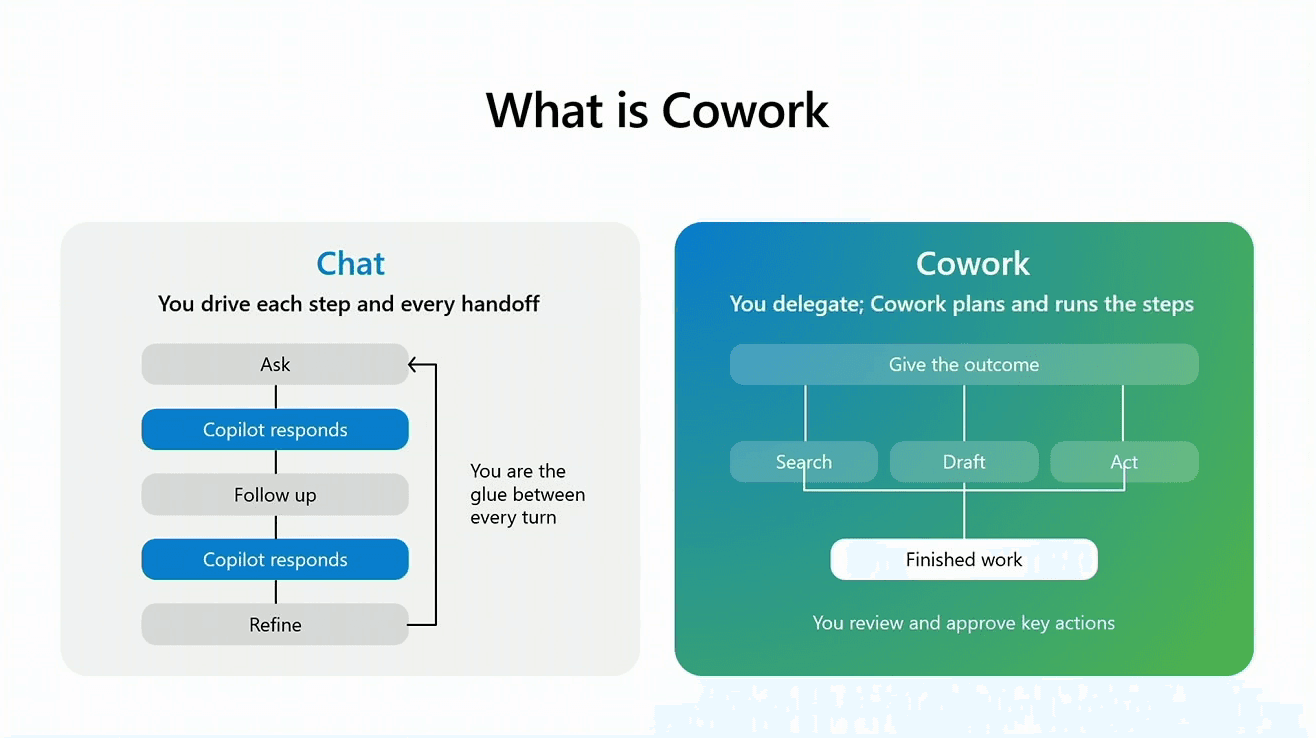
Copilot Cowork removes the glue. Cowork completes multistep work across Microsoft 365 by taking action for you, while Chat works inside a single conversation. You describe the result. Cowork plans the steps, works across Outlook, Teams, Word, Excel, and PowerPoint, and comes back with the finished thing.
Slide: Microsoft
Spot a Cowork job#
Chat suits a question, a draft, or a summary. Cowork suits work with several steps across more than one app, work you would normally block out an hour for, and work that comes round every week.
| The job | Where it goes |
|---|---|
| "What did the client say about the deadline?" | Chat |
| "Draft a reply to this email" | Chat |
| "Pull the last month of the project channel and the budget into a board update, then draft the email to the chair" | Cowork |
| "Every Friday, summarise the channel and chase anyone with an overdue action" | Cowork, on a schedule |
Chat answers in seconds to minutes. A Cowork job can run for minutes to hours, so give it work worth the wait.
You need a Microsoft 365 Copilot licence and usage-based billing enabled. Your IT team sets the spending limits.
Write the brief#
Cowork does what you ask, so a vague request gets a vague result.
Brief it the way you would brief a capable new starter who knows your systems but not your standards. Cover five things:
- The result. "A one-page Word update for Thursday's board meeting" beats "help me get ready for Thursday".
- The sources. Name the channel, the site, the files, the emails. Leave it open and Cowork goes looking, and it may find last year's version.
- The reader. Directors read differently from the project team.
- The limits. What it must not do, and who it must not contact.
- The check. What it should show you before it carries on.
Board-update brief:
Prepare a one-page update for the board on the website rebuild. Use the project channel in Teams from the last four weeks, the budget workbook in the Finance site, and my last two status emails. Write for directors, not the project team. Put anything over budget or late at the top. Draft it in Word and draft a covering email to the chair. Do not send anything.
The last line, "Do not send anything", keeps every draft with you until you have read it.
Approve before anything leaves#
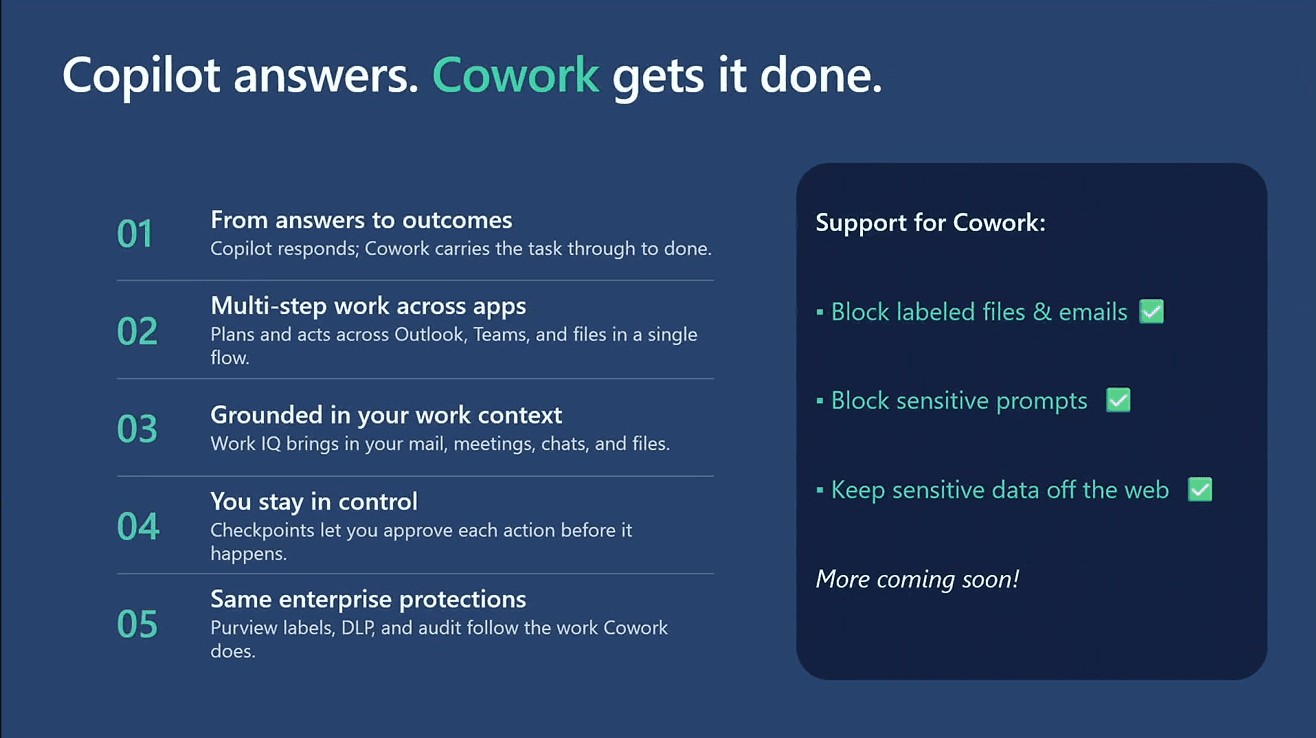
Before Cowork sends an email or posts in Teams, it shows you an approval prompt. You can approve that action once, approve and skip similar prompts for the rest of the conversation, or cancel. Medium and high risk actions show a risk level. Editing an existing Office file needs your approval too.
For your first month, approve each action yourself and read what it is about to send. You are learning how it reads your brief. A wrong assumption is cheap to catch at the approval prompt and expensive to catch in a client's inbox.
Once a pattern has been right every time for a few weeks, it is reasonable to skip similar prompts inside that one conversation.
Slide: Microsoft
Give long work a home#
A piece of work that runs for weeks needs somewhere to live. Projects in Cowork keep related tasks, instructions, and context together. You start tasks from the project, come back to related chats, and find the files those tasks produced. Projects are private to you.
Put the background, the key files, and your standing instructions in the project once. Tasks start with the project's instructions and available context, but listing an attachment in the project does not mean every task can use it.
For instructions that apply to everything you do, use custom instructions: your preferred tone, document formatting, and scheduling rules. Cowork applies them to every task.
Make it run on its own#
Cowork saves the most time on work that comes round on a schedule, because you set it up once instead of asking each time.
Tell Cowork what you want and when, such as a daily briefing every morning at 9 am, and it runs on schedule from the Automations tab. A task can also start when a matching email arrives or a Teams message is posted. By default those event-driven tasks prepare the actions for your approval rather than acting on their own. Leave that default alone until you have a reason to change it.
Good first candidates:
- a morning list of the meetings, emails, and decisions that need you today
- a Friday summary of a project channel, with open actions and who owns them
- a reply pack drafted whenever a particular client emails, waiting for your review
Know where it stops#
Cowork works with files in OneDrive and SharePoint. It cannot reach files stored only on your device, and it cannot delete files or folders. Attachments must be under 200 MB. It cannot read an encrypted file unless you hold the usage rights to extract and view it. Microsoft does not check custom skills that users create, so review what they produce.
Which AI models you get also depends on where your organisation sits. Organisations inside the EU Data Boundary get GPT models only, and Anthropic models are only offered in the regions Anthropic supports. If your organisation has a view on where model processing happens, settle it before Cowork goes out to everyone.
Pick one job you do every week that touches three apps. Write the five-part brief. Run it for three weeks and approve every action. If you have not got time back by week three, check the brief and sources first. Fix those, then put it on a schedule.

Mark Smith
Principal AI Counsel · Microsoft AI MVP
Helping people build practical AI skill in the Intelligence Age.
More from nz365guy

Microsoft’s Copilot Strategy: Turning Shared Context and Persistent Agents into Business Outcomes
Excel followed Lotus 1-2-3. Windows Server followed Novell NetWare. Xbox entered behind PlayStation but stayed in the fight long enough to earn a permanent seat at...
What Microsoft ISV Success taught me about tenant design
Microsoft ISV Success gave us useful cloud benefits, but assembling them into one clean development tenant exposed avoidable setup gaps.

What if every marae hosted a piece of the cloud?
A thought experiment in Māori data sovereignty: locally owned micro data centres that return skills, resilience, and a dividend to marae.
Discussion
Comments
Loading the discussion for this post.
Leave a comment
Your email stays private. If it matches a Gravatar account, your public avatar can appear after the comment is approved.