
Mark Smith
· 8 min read
An Azure photogrammetry pipeline for less than two coffees
Phase 2 of my property digital twin turns 743 drone photos into maps and models on an Azure VM that exists as billable compute for about four hours a month.
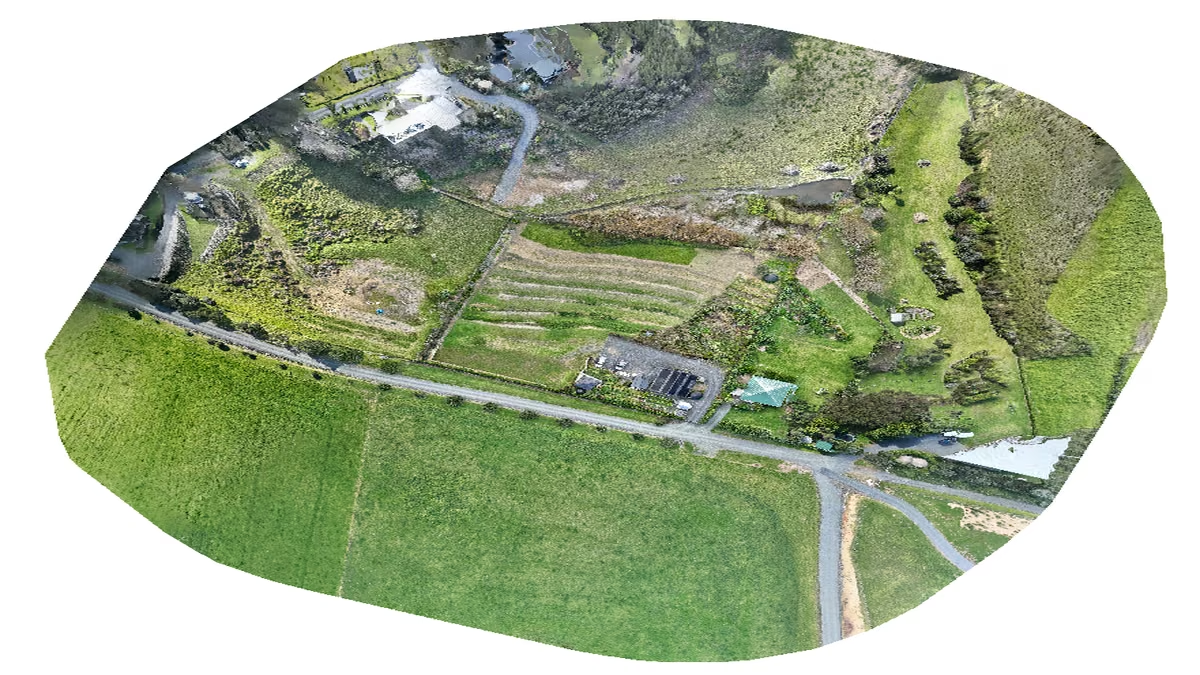
Phase 1 of the property digital twin gave me 743 photos of our 1.5 acres, captured on identical flight paths I can repeat every month. Phase 2 is where those photos become something: an orthomosaic at 0.86 centimetres per pixel, an elevation model, a 152-million-point 3D cloud, and a vegetation-health map.
This week that pipeline shipped on Azure. The interesting decisions are not in the photogrammetry. They are in how the cloud side is shaped around a workload that exists for four hours a month.
Key takeaway
- A 16-vCPU, 128 GB Azure VM processes the monthly survey, then deallocates itself.
- Temporary NVMe storage provides fast scratch space and removes the run credential when the VM deallocates.
- Managed identities and custom role-based access control keep the Azure blast radius deliberately small.
- The full monthly output costs less than two coffees at my current usage.
The shape of the problem#
Photogrammetry is a burst workload. Processing 743 twenty-megapixel photos into a fused reconstruction took 4 hours 16 minutes of solid compute, and then nothing happens for a month. Paying for an always-on machine sized for that burst would be roughly thirty times the money for the same output. The design principle is simple: the compute exists only while it is computing.
The processing virtual machine (VM) is a Standard E16ds v5 in the New Zealand North region: 16 virtual CPUs (vCPUs) and 128 GB of memory. That sounds extravagant for a hobby until you look at the meter. Deallocated, an Azure VM bills nothing for compute. You still pay for the operating system disk sitting in storage. Started, it runs the monthly job and stops. The month's entire compute bill lands in single-digit dollars, and most of the year the machine does not exist as a billable compute object.
The memory-heavy E-series matters for this workload. Structure-from-motion holds enormous feature-match graphs in memory, and dense point cloud generation is the same story. An undersized VM does not fail politely. It swaps, and a four-hour job becomes a two-day job. Sizing generously and running briefly beats sizing meanly and running long, both on cost and on wall-clock time.
The disk trick that does double duty#
The ds-series VM comes with a local temporary non-volatile memory express (NVMe) disk, 590 GB on this size, and Azure discards its contents when the VM deallocates. Most people treat that as a hazard. I treat it as a feature, twice over.
First, it is free fast scratch space. All the reproducible working data lives there: the month's raw photos pulled down from the archive, the processing workspace, and the intermediate products. None of it needs to survive because everything on that disk is either fetched from the archive or regenerated by the pipeline. The persistent operating system disk stays small and cheap and holds only the things worth keeping: the pinned WebODM install, Docker state, and configuration.
Second, it is a secrets janitor. The one credential the processing VM ever touches, a token for reaching the photo archive, is materialised onto the temporary disk at the start of each run with tight permissions. When the VM deallocates, Azure discards that disk. There is no cleanup script to forget and no stale credential accumulating on a machine that spends its life powered off. The platform's lifecycle does the hygiene.
Identity and blast radius#
No passwords or keys are stored anywhere for the Azure side because the VMs authenticate as themselves. Azure managed identities give each machine an identity in Microsoft Entra ID, and role-based access control (RBAC) decides what each identity can do. The interesting part is how little that needs to be.
The processing VM's identity holds exactly one custom role, and that role can do exactly one thing: deallocate the VM it belongs to. It cannot read storage, start machines, or see the subscription. If that machine were ever compromised, the attacker's total haul of Azure permissions would be the ability to turn it off.
The orchestration VM, the small always-on box that runs the monthly command, holds the data-plane roles instead. It can write blobs to the twin's storage account and read the account keys, and nothing else. Every blob operation it performs uses its identity directly. There are no connection strings or keys pasted into scripts. Two machines, two identities, two disjoint sets of least privilege, and the sum of both is still a long way short of Contributor on anything.
The network posture, and the layer that lies#
The processing VM has no public IP address. Its network security group denies all inbound traffic. Administration happens over a private mesh virtual private network (VPN), so the machine is reachable from my other machines and from nowhere else on earth. On the host itself, a deny-by-default firewall backs that up.
And then I bound the processing web interface to localhost anyway, because Docker can bypass your host firewall. Docker's published ports insert their own rules into the packet-filtering path, so a container can be reachable while your firewall configuration says the port is denied. On this VM, three other controls stand in the way: no public IP, the network security group, and the VPN boundary. Defence in depth exists because any one layer can fail. If you run containers anywhere internet-adjacent and have never checked this, go and check it now.
The billing backstop#
The design decision I would defend hardest in review is that the machine is responsible for its own death.
The monthly pipeline is one idempotent command with durable checkpoints, eleven stages from starting the VM through ingest, processing, validation, export, upload, and verification. Every stage records completion to disk on the orchestration side. If stage seven fails at 2:00 am, the error handler records where it stopped, deallocates the VM anyway, and the next run resumes at stage seven. A failure never leaves compute running.
Behind that sits a scheduled task on the VM itself that deallocates the machine every night regardless of what anyone thinks is happening. If the orchestration dies mid-run, the network drops, or I start the machine by hand and get distracted by dinner, the backstop fires. The failure mode of my failure handling should not be an invoice. With Azure's per-second billing, the cost of the backstop firing early is a rerun.
The export stage carries one more protective rule: it refuses to overwrite an existing archive file that differs from what it is about to write. The unbroken monthly record is the entire value of this system, and no bad reprocess gets to destroy it without a human passing an explicit force flag.
Two bugs worth your time#
The vegetation index nearly shipped garbage. The index divides by a sum of colour bands, and I guarded division by zero by substituting a tiny epsilon. That was the classic mistake. Near-zero denominators sailed past the guard and produced values in the hundreds of billions. The fix was to mask that neighbourhood out entirely and clip to the physically meaningful range. When you guard a computation, guard the neighbourhood of the failure, not the exact point of it.
The automation also deliberately skips WebODM's own API. It drives the processing engine underneath directly, which means there is no administrator account to create and no password to store, rotate, or leak. The web interface still exists for poking at datasets by hand. The best credential management is a credential that does not exist.
The bill, itemised#
For the month: about four hours of E16ds v5 compute, single-digit dollars. Blob storage for the viewer assets is well under a dollar at current volumes. The operating system disk at rest costs cents.
That produces an orthomosaic, elevation model, health map, and 152-million-point cloud of our own land, monthly, for less than two coffees. The cloud is genuinely cheap if your architecture respects when the work happens.
What to do next#
If you are designing a burst pipeline, start with the failure paths rather than the happy path. Decide what deallocates the compute when the orchestrator dies, which data is genuinely disposable, and the smallest permission each machine needs.
Then inspect every exposed container port from outside the host. A firewall rule is not evidence that the service is unreachable.
Mark Smith is Principal AI Strategist at Cloverbase. To discuss this article or work with me, contact me at Cloverbase.

Mark Smith
Principal AI Counsel · Microsoft AI MVP
Helping people build practical AI skill in the Intelligence Age.
More from nz365guy
What if every marae hosted a piece of the cloud?
A thought experiment in Māori data sovereignty: locally owned micro data centres that return skills, resilience, and a dividend to marae.
AI checks every mission file before my drone flies
My consumer Mavic 3 has no SDK, so repeatable survey flights depend on mission files. An AI inspection caught unsafe defaults and a 22.88-metre altitude error before...

Why I started NZ Ledger as open financial infrastructure
NZ Ledger is my plan for open-source financial infrastructure designed for people, AI agents, and New Zealand businesses.
Discussion
Comments
Loading the discussion for this post.
Leave a comment
Your email stays private. If it matches a Gravatar account, your public avatar can appear after the comment is approved.