
Mark Smith
· 6 min read
Connecting AI Agents to Microsoft Planner: ETags, Group Permissions, and the Graph API's Opinions
Microsoft Planner's API enforces optimistic concurrency with ETags, requires Group membership for plan creation, and uses User IDs for assignments. Here's how I...
In my previous post, I replaced MOG with cb365 for Mail, Calendar, and Contacts, built 23 safety rules into the binary, and established the two-layer safety model that separates CLI-enforced physics from agent-enforced policy.
Next: Microsoft Planner. On the surface, Planner is just another CRUD workload - plans, buckets, tasks. Eight commands, same patterns as Microsoft To Do. But Planner taught me three things that none of the previous workloads exposed.
Key takeaway
- Planner enforces optimistic concurrency with ETags: every PATCH and DELETE requires a fresh
If-Matchheader or you'll hit 409 Conflicts - Plans belong to Microsoft 365 Groups, not users - you need Group membership (not just ownership) to create plans
- Task assignments use User IDs, not emails, but you can resolve emails to IDs via the
/users/{userPrincipalName}endpoint without extra permissions
Contents#
- 1. The ETag Problem: Planner's Concurrency Model
- 2. Plans Are Owned by Groups, Not Users
- 3. Assignment Uses User IDs, Not Emails
- Wiring the BOS: From Agent Coordination to Real Tasks
- Safety Rules for Planner: Lighter Than Calendar
- What's Next
1. The ETag Problem: Planner's Concurrency Model#
Every other Microsoft Graph workload I've built treats PATCH and DELETE as simple operations. You send a body, the API applies it. Calendar has safety complexity (timezone validation, series master protection, duplicate detection), but the HTTP mechanics are straightforward.
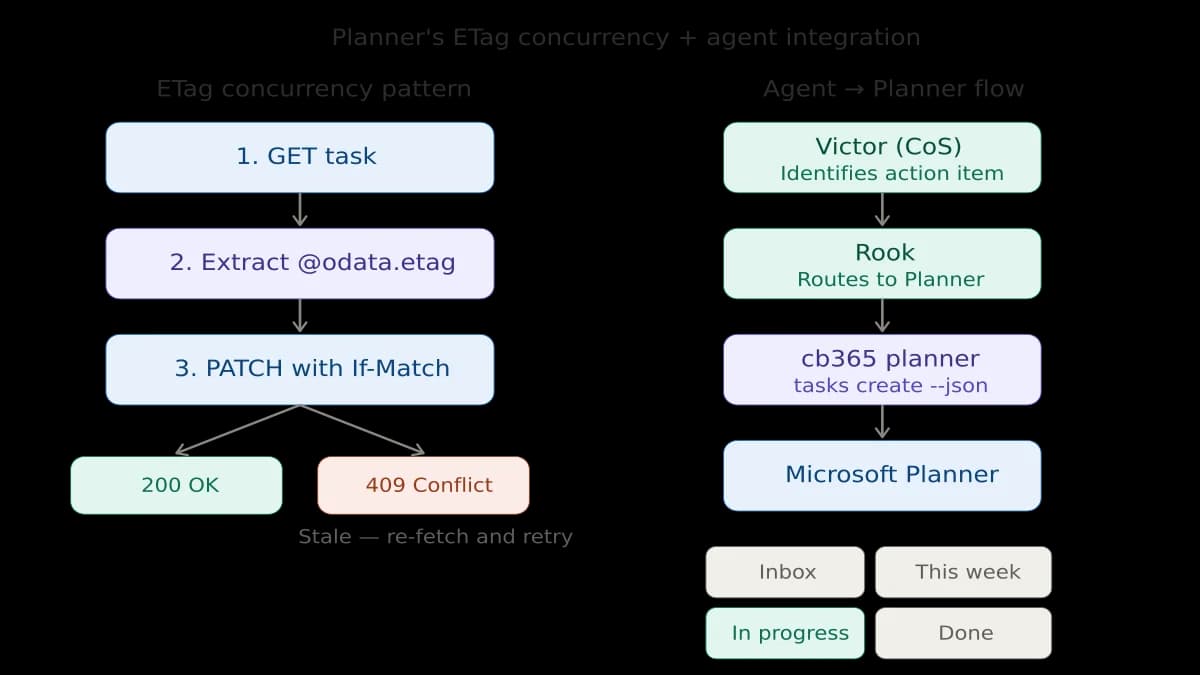
Planner is different. Every PATCH and DELETE request requires an If-Match header containing the entity's @odata.etag value. If you don't include it, you get a 400. If the ETag is stale (because someone or something modified the task since you last fetched it), you get a 409 Conflict.
This is optimistic concurrency control, and it's there for a good reason - Planner is inherently multi-user. A plan might have ten people moving tasks between buckets simultaneously. Without ETag enforcement, the last writer silently wins and overwrites everyone else's changes.
For a human using Planner in a browser, this is invisible. The UI fetches the latest state before every operation. For a CLI, it means every write operation becomes a two-step process:
1. GET the task → extract @odata.etag from additionalData
2. PATCH/DELETE with If-Match header set to that ETag
The implementation detail that tripped me up: the Go SDK for Graph stores the ETag in GetAdditionalData()["@odata.etag"], and it can come back as either a string or a *string depending on how the SDK deserialised the response. My getETag() helper handles both. That's the kind of thing that passes unit tests with mock data and fails in production with a nil pointer panic - which is exactly what happened on the first live test.
The safety implication for agents is important. An agent that caches task data and tries to update later will hit 409 Conflicts regularly. The skill file I wrote for Rook explicitly says: always fetch immediately before update, never cache ETags.
2. Plans Are Owned by Groups, Not Users#
Microsoft To Do lists belong to a user. Calendar events belong to a user. Contacts belong to a user. Planner plans belong to Microsoft 365 Groups.
This is a fundamental architectural difference that affected the CLI design. Creating a plan requires --group-id - you need to know which Microsoft 365 Group will own it. Listing plans uses /me/planner/plans (delegated) or requires iterating groups (app-only). And the user must be a member of the group to create plans in it - being an owner alone isn't sufficient.
For agent consumption, this means Rook needs to know which group to target. I solved this by creating a dedicated Microsoft 365 Group and embedding the group ID, plan ID, and bucket IDs directly in the Rook skill file. When Victor (the Chief of Staff agent) identifies an action item from cross-department coordination, the routing is deterministic: specific plan, specific bucket, no ambiguity.
3. Assignment Uses User IDs, Not Emails#
Planner assignments are a map of user GUIDs to assignment objects. You can't just pass an email address - you need the underlying user ID.
My first approach was to resolve the email using a $filter query against /users. This requires User.ReadBasic.All scope, which I hadn't granted. The fix was simpler: Microsoft Graph accepts User Principal Name (UPN) directly in the /users/{id-or-userPrincipalName} path. So resolveUserID() just calls client.Users().ByUserId("user@domain.com").Get() and extracts the ID. No additional scope needed, no $filter parsing, and it works for both email addresses and raw GUIDs.
Wiring the BOS: From Agent Coordination to Real Tasks#
The most satisfying outcome isn't the CLI commands - it's the integration.
I run a 23-agent Business Operating System (BOS). Victor, the Chief of Staff agent, coordinates work across 12 department leads. When departments surface action items that need tracking, Victor used to describe them in messages. They'd be read, sometimes acted on, often lost in the scroll.
Now the flow is concrete:
- Victor identifies an action item from a department report
- Victor sends it to Rook (the personal assistant agent) via the inter-agent messaging system
- Rook creates a Planner task in the BOS Operations plan, assigns it, sets a due date
- The task appears in Microsoft Planner - on my phone, in Teams, in the web app
- As work progresses, Rook updates the task status
The bucket structure is deliberate: Inbox (new items from Victor), This Week (committed work), In Progress (actively being worked), Done (completed, never deleted). This maps to how I actually manage work, not how a project management textbook suggests I should.
Safety Rules for Planner: Lighter Than Calendar#
Planner has three CLI-enforced safety rules:
--forcerequired for all deletes - Prevents accidental deletion--dry-runavailable on all write operations - Preview changes before applying- ETag
If-Matchheaders on all updates and deletes - Prevents stale writes
This is deliberately lighter than Calendar's 14 rules. A misfired Planner task is annoying. A misfired calendar invite goes to real people's inboxes. The blast radius determines the safety surface.
The agent-layer rules (in the Rook skill file) are more extensive: no bulk operations over 10 tasks, no modifying other users' assigned tasks, no backward progress changes, duplicate checking before creation. These are policy decisions that an agent should follow but that don't warrant mechanical enforcement.
What's Next#
Next up: Microsoft Teams and Loop - bringing agent communication into the collaboration platform where most enterprise work actually happens.
The repo will go public when hardening is complete. Until then, the build log continues.
This is part of the Building a Microsoft 365 CLI series. Previous: 23 Safety Rules I Built Into a Microsoft 365 CLI. Next: 44 Safety Rules, 58 Commands, and Microsoft Loop's Missing API.
Related reading#
- AI Agents Getting the Date Wrong? Timezone Configuration in OpenCLAW - How I fixed timezone handling across a 23-agent system running on UTC servers from New Zealand
Mark Smith is the founder of Cloverbase, an AI strategy consultancy based in Whangārei Heads, New Zealand.

Mark Smith
Principal AI Counsel · Microsoft AI MVP
Helping people build practical AI skill in the Intelligence Age.
More from nz365guy

What if every marae hosted a piece of the cloud?
A thought experiment in Māori data sovereignty: locally owned micro data centres that return skills, resilience, and a dividend to marae.
An Azure photogrammetry pipeline for less than two coffees
Phase 2 of my property digital twin turns 743 drone photos into maps and models on an Azure VM that exists as billable compute for about four hours a month.

AI checks every mission file before my drone flies
My consumer Mavic 3 has no SDK, so repeatable survey flights depend on mission files. An AI inspection caught unsafe defaults and a 22.88-metre altitude error before...
Discussion
Comments
Loading the discussion for this post.
Leave a comment
Your email stays private. If it matches a Gravatar account, your public avatar can appear after the comment is approved.