
Mark Smith
· 10 min read
Shipping a Microsoft 365 CLI: Signed Binaries, SBOMs, and the Bug That Hid for Four Months
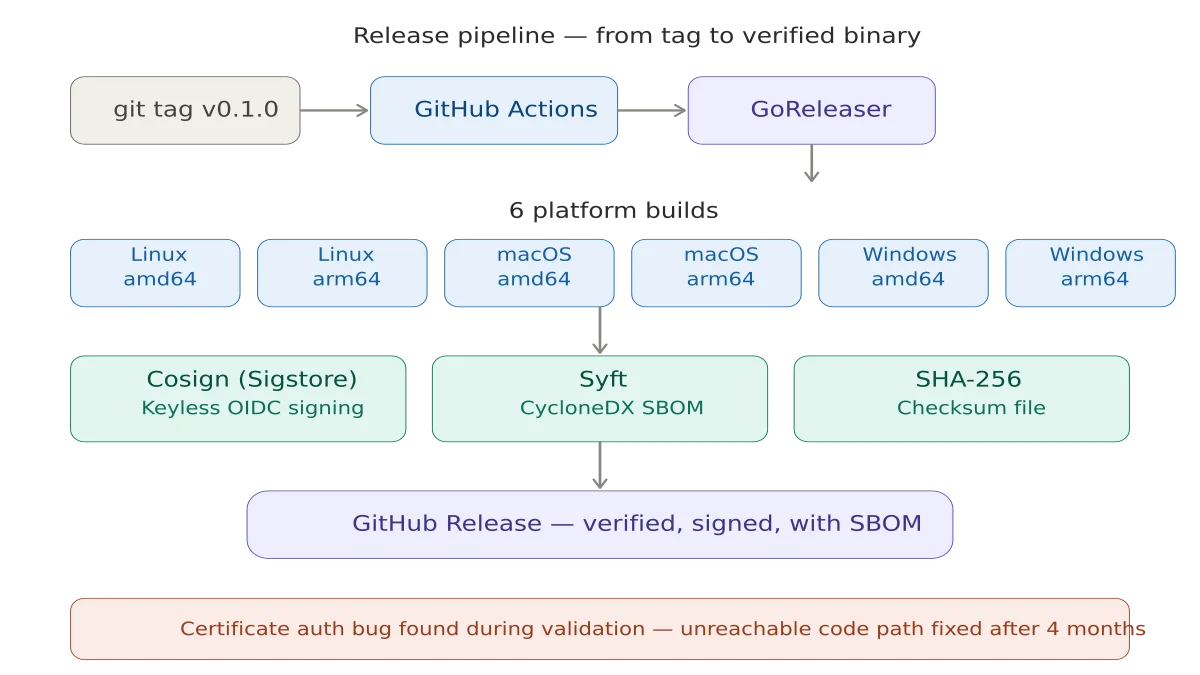
Taking cb365 from internal tool to public release meant solving the trust problem: signed binaries, Software Bill of Materials (SBOM), and a certificate...
Key takeaway
- Shipping internal tools publicly is a trust problem, not a code problem - signed binaries and SBOMs matter more than features
- The certificate authentication bug survived the entire build because it was never tested end-to-end against a live Entra ID tenant
- Integration tests against real systems catch what unit tests miss, especially in credential-handling code
There is a moment in every project where the code is done but the project is not. cb365 hit that moment after shipping ten workloads. Fifty-eight commands across ten Microsoft 365 workloads. Forty-four safety rules hardcoded in Go. Eight agent skill playbooks. Ninety-three passing tests. All of it running inside a 23-agent AI operating system on my Azure VM, managing my calendar, tasks, mail, Planner boards, Teams messages, SharePoint sites, OneDrive files, and Loop workspaces.
But if I gave you the repository, you could not use it. Not because the code was bad, but because the code was incomplete without context. No getting started guide. No Entra app registration walkthrough. No pre-built binaries. No way to verify the binary you downloaded was the binary I built.
This is the work that makes cb365 usable by someone who is not me.
The Trust Problem#
When you build a tool that handles authentication tokens, the bar for going public is higher than "does it compile." The internal/auth/ module is 648 lines of Go that stores credentials in your operating system's keychain, falls back to AES-256-GCM encrypted files on headless Linux, and handles three distinct Microsoft Entra ID authentication flows. If any of those 648 lines has a bug, someone's Microsoft 365 tenant is exposed.
This is not hypothetical. During end-to-end validation, I found exactly such a bug.
The Certificate Auth Bug#
cb365 supports three authentication flows, shipped across the project:
Device-code flow was first. You run the command, it gives you a URL and a code, you authenticate in a browser. Simple, secure, and the user sees exactly what permissions they are granting. This has been live and verified against my Entra ID tenant since day one.
Client credentials came next. This is for unattended automation - scheduled agent jobs that run at 7am without human intervention. It uses a client secret stored encrypted in the OS keychain. This has been running continuously on my VM since the auth foundation shipped.
Certificate authentication came last. Instead of a string secret, the app authenticates with an X.509 certificate whose private key never leaves the machine. This is Microsoft's recommended approach for production. The code was written alongside client credentials, the PEM (Privacy Enhanced Mail) parser tested with RSA and EC key formats, and the implementation reviewed against Microsoft's documentation.
But here is the thing: the certificate flow had never been tested end-to-end against a real Entra ID app registration. The code was there. The unit tests for PEM parsing passed. The --certificate flag was documented. But nobody had ever generated a certificate, uploaded the public key to an Entra app, and run cb365 auth login --mode app-only --certificate cert.pem against a live tenant.
When I finally did this during end-to-end validation, it failed immediately - but not where I expected.
The bug was not in the certificate parsing or the Azure SDK call. It was in the command routing. The app-only login handler checked for a client secret first:
if loginClientSecret == "" {
    // Try reading from stdin...
    return error("--client-secret is required for app-only mode")
}

if loginCertificate != "" {
    // Certificate path - never reached
}
The certificate check came after the client-secret gate. If you passed --certificate without --client-secret, the command errored out before it ever looked at the certificate flag. The certificate path was unreachable.
The fix was straightforward - check for --certificate first, fall back to client-secret second. Five minutes to fix, but the bug had been there since the auth foundation was built. The bug sat there through the entire build, used daily in production, and nobody noticed. The third authentication flow had never actually worked.
The lesson is not subtle: if you did not test it end-to-end against the real system, it does not work. Unit tests are necessary but not sufficient. Integration tests against a live tenant are what caught this. The takeaway for anyone building credential-handling tools: your test pyramid needs live integration tests at the top, not just mocked unit tests at the bottom.
Supply Chain Security#
When you download a binary from the internet and give it your Microsoft 365 credentials, you are making a trust decision. The goal is to make that decision as informed as possible.
Signed releases. Every release binary is signed using Sigstore's cosign with keyless signing via GitHub Actions' OpenID Connect (OIDC) identity. The signature proves the binary was built by the GitHub Actions workflow in the cb365 repository - not by someone who compromised a download mirror.
Software Bill of Materials (SBOM). Every release archive gets a CycloneDX SBOM generated by Syft, listing every dependency and its version. If a vulnerability is found in any dependency, you can check whether your version of cb365 is affected without reading source code.
Checksum verification. A SHA-256 checksum file covers every release artifact. The checksum file itself is signed, so you can verify the checksums before verifying individual files.
The pipeline is a .goreleaser.yaml that builds for six platforms - Linux, macOS, and Windows on both amd64 and arm64 - and a GitHub Actions workflow that installs cosign, syft, and GoReleaser, triggered by pushing a version tag.
The 15-Minute Test#
The exit criterion is specific: a developer with an E3 or E5 Microsoft 365 tenant can clone the repository, register an Entra ID app, authenticate, and list their To Do tasks within 15 minutes.
This drove the README rewrite. The old README was a placeholder - project name, a few feature bullets, a minimal quick start. The new README is the front door: a step-by-step Entra app registration walkthrough, authentication examples for all three flows, a command reference covering all 58 commands, a safety rules overview explaining the 44 hardcoded guards, and agent integration guidance for using cb365 with AI orchestrators.
The test is not "can someone figure it out." The test is "can someone follow the instructions without needing to figure anything out."
Integration Tests#
This release adds an integration test suite that makes real Microsoft Graph API calls against a live tenant. Sixteen tests covering every workload:
- Auth - Status and profile listing
- To Do - Full lifecycle: create task, complete it, delete it
- Mail - List inbox, search messages
- Calendar - List events in a date range
- Contacts - List and search
- Planner - List plans
- Teams - List channels, list chats
- SharePoint - List sites
- OneDrive - List root folder
- Safety - Verify
--dry-rundoes not create a task
The tests are gated behind a Go build tag (//go:build integration) so they do not run in CI - they require live credentials. They run in just over ten seconds, which means they can be part of a pre-release checklist rather than an afterthought.
The dry-run safety test is my favourite. It runs cb365 todo tasks create --dry-run, then immediately lists the target task list and asserts the task does not exist. If --dry-run ever breaks, this test catches it before a release goes out.
What Ships#
This release adds to the cb365 repository:
- Dependabot for automated dependency updates on Go modules and GitHub Actions
- README rewritten from 26 lines to 546 lines - getting started, Entra walkthrough, full command reference, safety overview, agent integration guide
- CONTRIBUTING.md covering code style, quality gates, and the process for adding new workloads
- GoReleaser configuration for six-platform builds with cosign signing and CycloneDX SBOMs
- Generic agent skill file - 307 lines teaching an AI agent how to use every cb365 command
- Integration test suite - 16 tests against a live Microsoft 365 tenant
- Certificate auth bug fix - the third authentication flow now actually works
The repository is ready to go public when I decide to flip the switch.
What I Learned#
Building cb365 from foundation to public release taught me things I would not have learned from reading documentation.
Test against the real system. The certificate auth bug survived the entire build because nobody ran it against Entra. PEM parsing tests passing is not the same as authentication succeeding. This applies to any integration: if you are building an AI agent system like I described in my post about OpenCLAW timezone configuration, test it against real calendar APIs, not just mocked responses.
Safety rules are features. The 44 hardcoded safety rules in cb365 are not overhead - they are the reason I trust an AI agent to manage my calendar at 7am while I am asleep. When the safety is in the code rather than the prompt, it cannot be talked out of. This is the same principle that applies when developing an AI mindset for work: guardrails should be structural, not just instructional.
Going public is a different kind of work. Internal tools can be incomplete because you have context. Public tools must be complete because strangers do not. The README, the signing, the SBOMs, the contributor guide - this is not polish. This is the difference between a tool and a project.
Single-binary CLIs age well. A year from now, the Go binary I built today will still work. No runtime updates, no dependency conflicts, no Docker image to rebuild. For credential-handling tools especially, the smallest supply chain surface is the right one.
What Comes Next#
The repository goes public when two things are true: the auth module has passed an external security review, and I have decided that now is the right time.
After that, cb365 becomes a building block. Any developer with a Microsoft 365 tenant can script their workloads. Any AI agent framework can drive M365 through structured JSON output. And anyone who wants to understand how to build a credential-handling CLI in Go has 9,000 lines of annotated, tested, security-scanned source code to learn from.
The code is at github.com/nz365guy/cb365. The safety rules are in the binary, not the documentation. And the certificate authentication flow - finally - works.
This is part of the Building a Microsoft 365 CLI series. Previous: 44 Safety Rules, 58 Commands, and Microsoft Loop's Missing API.
Related reading#
- AI Agents and Timezone Configuration: The Bug You Only Find in Production - Another lesson from the OpenCLAW system about why integration tests against live systems matter more than you think.
- Embracing the Future: Developing an AI Mindset for Work and Life - On building structural guardrails into AI systems rather than relying on instructions alone.
- Model Routing Intelligence - How the 23-agent OpenCLAW system decides which AI model handles each request.
Mark Smith is the founder of Cloverbase, an AI strategy consultancy based in Whangārei Heads, New Zealand.

Mark Smith
Principal AI Counsel · Microsoft AI MVP
Helping people build practical AI skill in the Intelligence Age.
More from nz365guy

What if every marae hosted a piece of the cloud?
A thought experiment in Māori data sovereignty: locally owned micro data centres that return skills, resilience, and a dividend to marae.
An Azure photogrammetry pipeline for less than two coffees
Phase 2 of my property digital twin turns 743 drone photos into maps and models on an Azure VM that exists as billable compute for about four hours a month.

AI checks every mission file before my drone flies
My consumer Mavic 3 has no SDK, so repeatable survey flights depend on mission files. An AI inspection caught unsafe defaults and a 22.88-metre altitude error before...
Discussion
Comments
Loading the discussion for this post.
Leave a comment
Your email stays private. If it matches a Gravatar account, your public avatar can appear after the comment is approved.